Chapter 3. The Domain Language of Batch
To any experienced batch architect, the overall concepts of batch processing used in Spring Batch should be familiar and comfortable. There are "Jobs" and "Steps" and developer supplied processing units called ItemReaders and ItemWriters. However, because of the Spring patterns, operations, templates, callbacks, and idioms, there are opportunities for the following:
-
significant improvement in adherence to a clear separation of concerns
-
clearly delineated architectural layers and services provided as interfaces
-
simple and default implementations that allow for quick adoption and ease of use out-of-the-box
-
significantly enhanced extensibility
The diagram below is simplified version of the batch reference architecture that has been used for decades. It provides an overview of the components that make up the domain language of batch processing. This architecture framework is a blueprint that has been proven through decades of implementations on the last several generations of platforms (COBOL/Mainframe, C++/Unix, and now Java/anywhere). JCL and COBOL developers are likely to be as comfortable with the concepts as C++, C# and Java developers. Spring Batch provides a physical implementation of the layers, components and technical services commonly found in robust, maintainable systems used to address the creation of simple to complex batch applications, with the infrastructure and extensions to address very complex processing needs.
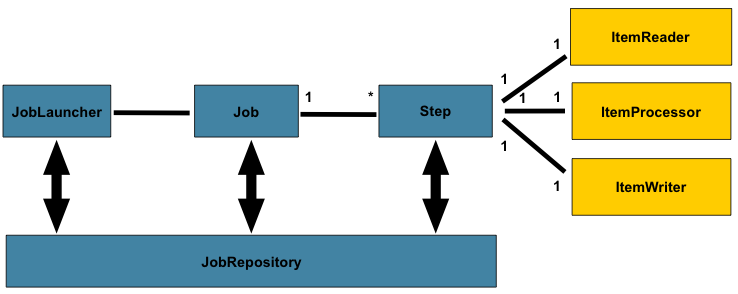
Figure 2.1: Batch Stereotypes
The diagram above highlights the key concepts that make up the domain language of batch. A Job has one to many steps, which has exactly one ItemReader, ItemProcessor, and ItemWriter. A job needs to be launched (JobLauncher), and meta data about the currently running process needs to be stored (JobRepository).
Job
This section describes stereotypes relating to the concept of a
batch job. A Job is an entity that encapsulates an
entire batch process. As is common with other Spring projects, a
Job will be wired together via an XML configuration
file or Java based configuration. This configuration may be referred to as
the "job configuration". However, Job is just the
top of an overall hierarchy:

In Spring Batch, a Job is simply a container for Steps. It combines multiple steps that belong logically together in a flow and allows for configuration of properties global to all steps, such as restartability. The job configuration contains:
-
The simple name of the job
-
Definition and ordering of Steps
-
Whether or not the job is restartable
A default simple implementation of the Job
interface is provided by Spring Batch in the form of the
SimpleJob class which creates some standard
functionality on top of Job, however the batch
namespace abstracts away the need to instantiate it directly. Instead, the
<job> tag can be used:
<job id="footballJob">
    <step id="playerload" next="gameLoad"/>
    <step id="gameLoad" next="playerSummarization"/>
    <step id="playerSummarization"/>
</job>
JobInstance
A JobInstance refers to the concept of a
logical job run. Let's consider a batch job that should be run once at
the end of the day, such as the 'EndOfDay' job from the diagram above.
There is one 'EndOfDay' Job, but each individual
run of the Job must be tracked separately. In the
case of this job, there will be one logical
JobInstance per day. For example, there will be a
January 1st run, and a January 2nd run. If the January 1st run fails the
first time and is run again the next day, it is still the January 1st
run. (Usually this corresponds with the data it is processing as well,
meaning the January 1st run processes data for January 1st, etc).
Therefore, each JobInstance can have multiple
executions (JobExecution is discussed in more
detail below) and only one JobInstance
corresponding to a particular Job and
identifying JobParameters can be running at a given
time.
The definition of a JobInstance has
absolutely no bearing on the data the will be loaded. It is entirely up
to the ItemReader implementation used to
determine how data will be loaded. For example, in the EndOfDay
scenario, there may be a column on the data that indicates the
'effective date' or 'schedule date' to which the data belongs. So, the
January 1st run would only load data from the 1st, and the January 2nd
run would only use data from the 2nd. Because this determination will
likely be a business decision, it is left up to the
ItemReader to decide. What using the same
JobInstance will determine, however, is whether
or not the 'state' (i.e. the ExecutionContext,
which is discussed below) from previous executions will be used. Using a
new JobInstance will mean 'start from the
beginning' and using an existing instance will generally mean 'start
from where you left off'.
JobParameters
Having discussed JobInstance and how it
differs from Job, the natural question to ask is:
"how is one JobInstance distinguished from
another?" The answer is: JobParameters.
JobParameters is a set of parameters used to
start a batch job. They can be used for identification or even as
reference data during the run:

In the example above, where there are two instances, one for
January 1st, and another for January 2nd, there is really only one Job,
one that was started with a job parameter of 01-01-2008 and another that
was started with a parameter of 01-02-2008. Thus, the contract can be
defined as: JobInstance =
Job + identifying JobParameters. This
allows a developer to effectively control how a
JobInstance is defined, since they control what
parameters are passed in.
![[Note]](images/note.png) | Note |
|---|---|
|
Not all job parameters are required to contribute to the identification
of a |
JobExecution
A JobExecution refers to the technical
concept of a single attempt to run a Job. An
execution may end in failure or success, but the
JobInstance corresponding to a given execution
will not be considered complete unless the execution completes
successfully. Using the EndOfDay Job described
above as an example, consider a JobInstance for
01-01-2008 that failed the first time it was run. If it is run again
with the same identifying job parameters as the first run (01-01-2008), a new
JobExecution will be created. However, there will
still be only one JobInstance.
A Job defines what a job is and how it is
to be executed, and JobInstance is a purely
organizational object to group executions together, primarily to enable
correct restart semantics. A JobExecution,
however, is the primary storage mechanism for what actually happened
during a run, and as such contains many more properties that must be
controlled and persisted:
| status | A BatchStatus object that
indicates the status of the execution. While running, it's
BatchStatus.STARTED, if it fails, it's BatchStatus.FAILED, and
if it finishes successfully, it's BatchStatus.COMPLETED |
| startTime | A java.util.Date representing the
current system time when the execution was started. |
| endTime | A java.util.Date representing the
current system time when the execution finished, regardless of
whether or not it was successful. |
| exitStatus | The ExitStatus indicating the
result of the run. It is most important because it contains an
exit code that will be returned to the caller. See chapter 5 for
more details. |
| createTime | A java.util.Date representing the
current system time when the JobExecution
was first persisted. The job may not have been started yet (and
thus has no start time), but it will always have a createTime,
which is required by the framework for managing job level
ExecutionContexts. |
| lastUpdated | A java.util.Date representing the
last time a JobExecution was
persisted. |
| executionContext | The 'property bag' containing any user data that needs to be persisted between executions. |
| failureExceptions | The list of exceptions encountered during the execution
of a Job. These can be useful if more
than one exception is encountered during the failure of a
Job. |
These properties are important because they will be persisted and can be used to completely determine the status of an execution. For example, if the EndOfDay job for 01-01 is executed at 9:00 PM, and fails at 9:30, the following entries will be made in the batch meta data tables:
| JOB_INST_ID | JOB_NAME |
| 1 | EndOfDayJob |
| JOB_EXECUTION_ID | TYPE_CD | KEY_NAME | DATE_VAL | IDENTIFYING |
| 1 | DATE | schedule.Date | 2008-01-01 | TRUE |
| JOB_EXEC_ID | JOB_INST_ID | START_TIME | END_TIME | STATUS |
| 1 | 1 | 2008-01-01 21:00 | 2008-01-01 21:30 | FAILED |
| Note |
|---|---|
|
column names may have been abbreviated or removed for clarity and formatting |
Now that the job has failed, let's assume that it took the entire
course of the night for the problem to be determined, so that the 'batch
window' is now closed. Assuming the window starts at 9:00 PM, the job
will be kicked off again for 01-01, starting where it left off and
completing successfully at 9:30. Because it's now the next day, the
01-02 job must be run as well, which is kicked off just afterwards at
9:31, and completes in its normal one hour time at 10:30. There is no
requirement that one JobInstance be kicked off
after another, unless there is potential for the two jobs to attempt to
access the same data, causing issues with locking at the database level.
It is entirely up to the scheduler to determine when a
Job should be run. Since they're separate
JobInstances, Spring Batch will make no attempt
to stop them from being run concurrently. (Attempting to run the same
JobInstance while another is already running will
result in a JobExecutionAlreadyRunningException
being thrown). There should now be an extra entry in both the
JobInstance and
JobParameters tables, and two extra entries in
the JobExecution table:
| JOB_INST_ID | JOB_NAME |
| 1 | EndOfDayJob |
| 2 | EndOfDayJob |
| JOB_EXECUTION_ID | TYPE_CD | KEY_NAME | DATE_VAL | IDENTIFYING |
| 1 | DATE | schedule.Date | 2008-01-01 00:00:00 | TRUE |
| 2 | DATE | schedule.Date | 2008-01-01 00:00:00 | TRUE |
| 3 | DATE | schedule.Date | 2008-01-02 00:00:00 | TRUE |
| JOB_EXEC_ID | JOB_INST_ID | START_TIME | END_TIME | STATUS |
| 1 | 1 | 2008-01-01 21:00 | 2008-01-01 21:30 | FAILED |
| 2 | 1 | 2008-01-02 21:00 | 2008-01-02 21:30 | COMPLETED |
| 3 | 2 | 2008-01-02 21:31 | 2008-01-02 22:29 | COMPLETED |
| Note |
|---|---|
|
column names may have been abbreviated or removed for clarity and formatting |