 af8b7f975d
This commit updates URLs to prefer the https protocol. Redirects are not followed to avoid accidentally expanding intentionally shortened URLs (i.e. if using a URL shortener).

These URLs were unable to be fixed. Please review them to see if they can be manually resolved.

* [ ] http://gophercloud.io/docs/ (200) with 1 occurrences could not be migrated:
   ([https](https://gophercloud.io/docs/) result SSLHandshakeException).
* [ ] http://man7.org/linux/man-pages/man7/glob.7.html (200) with 1 occurrences could not be migrated:
   ([https](https://man7.org/linux/man-pages/man7/glob.7.html) result AnnotatedConnectException).
* [ ] http://services.typefox.io/open-source/jenkins/job/lsp4j/job/master/lastStableBuild/artifact/build/p2-repository/ (200) with 1 occurrences could not be migrated:
   ([https](https://services.typefox.io/open-source/jenkins/job/lsp4j/job/master/lastStableBuild/artifact/build/p2-repository/) result SSLHandshakeException).

These URLs were fixed, but the https status was not OK. However, the https status was the same as the http request or http redirected to an https URL, so they were migrated. Your review is recommended.

* [ ] http://cfapps.io:1000/hello (ConnectTimeoutException) with 2 occurrences migrated to:
  https://cfapps.io:1000/hello ([https](https://cfapps.io:1000/hello) result ConnectTimeoutException).
* [ ] http://cfapps.io:1001/hello (ConnectTimeoutException) with 2 occurrences migrated to:
  https://cfapps.io:1001/hello ([https](https://cfapps.io:1001/hello) result ConnectTimeoutException).
* [ ] http://cfapps.io:1002/hello (ConnectTimeoutException) with 2 occurrences migrated to:
  https://cfapps.io:1002/hello ([https](https://cfapps.io:1002/hello) result ConnectTimeoutException).
* [ ] http://cfapps.io:1111/ (ConnectTimeoutException) with 2 occurrences migrated to:
  https://cfapps.io:1111/ ([https](https://cfapps.io:1111/) result ConnectTimeoutException).
* [ ] http://cfapps.io:1111/fromEnv/hello-world (ConnectTimeoutException) with 2 occurrences migrated to:
  https://cfapps.io:1111/fromEnv/hello-world ([https](https://cfapps.io:1111/fromEnv/hello-world) result ConnectTimeoutException).
* [ ] http://cfapps.io:1111/fromenvironment/hello-world (ConnectTimeoutException) with 2 occurrences migrated to:
  https://cfapps.io:1111/fromenvironment/hello-world ([https](https://cfapps.io:1111/fromenvironment/hello-world) result ConnectTimeoutException).
* [ ] http://cfapps.io:1111/fromlaunchconfig/hello-world (ConnectTimeoutException) with 10 occurrences migrated to:
  https://cfapps.io:1111/fromlaunchconfig/hello-world ([https](https://cfapps.io:1111/fromlaunchconfig/hello-world) result ConnectTimeoutException).
* [ ] http://cfapps.io:1111/frompropsfile/hello-world (ConnectTimeoutException) with 8 occurrences migrated to:
  https://cfapps.io:1111/frompropsfile/hello-world ([https](https://cfapps.io:1111/frompropsfile/hello-world) result ConnectTimeoutException).
* [ ] http://cfapps.io:1111/hello-world (ConnectTimeoutException) with 2 occurrences migrated to:
  https://cfapps.io:1111/hello-world ([https](https://cfapps.io:1111/hello-world) result ConnectTimeoutException).
* [ ] http://cfapps.io:1111/inner-class (ConnectTimeoutException) with 2 occurrences migrated to:
  https://cfapps.io:1111/inner-class ([https](https://cfapps.io:1111/inner-class) result ConnectTimeoutException).
* [ ] http://cfapps.io:1111/inner-inner-class (ConnectTimeoutException) with 2 occurrences migrated to:
  https://cfapps.io:1111/inner-inner-class ([https](https://cfapps.io:1111/inner-inner-class) result ConnectTimeoutException).
* [ ] http://cfapps.io:1111/mockedpath/hello-world (ConnectTimeoutException) with 2 occurrences migrated to:
  https://cfapps.io:1111/mockedpath/hello-world ([https](https://cfapps.io:1111/mockedpath/hello-world) result ConnectTimeoutException).
* [ ] http://cfapps.io:999/find (ConnectTimeoutException) with 14 occurrences migrated to:
  https://cfapps.io:999/find ([https](https://cfapps.io:999/find) result ConnectTimeoutException).
* [ ] http://cfapps.io:999/goodbye (ConnectTimeoutException) with 2 occurrences migrated to:
  https://cfapps.io:999/goodbye ([https](https://cfapps.io:999/goodbye) result ConnectTimeoutException).
* [ ] http://cfapps.io:999/greetings (ConnectTimeoutException) with 4 occurrences migrated to:
  https://cfapps.io:999/greetings ([https](https://cfapps.io:999/greetings) result ConnectTimeoutException).
* [ ] http://cfapps.io:999/hello (ConnectTimeoutException) with 4 occurrences migrated to:
  https://cfapps.io:999/hello ([https](https://cfapps.io:999/hello) result ConnectTimeoutException).
* [ ] http://cfapps.io:999/mockedpath/greetings (ConnectTimeoutException) with 2 occurrences migrated to:
  https://cfapps.io:999/mockedpath/greetings ([https](https://cfapps.io:999/mockedpath/greetings) result ConnectTimeoutException).
* [ ] http://cfapps.io:999/mockedpath/hello (ConnectTimeoutException) with 2 occurrences migrated to:
  https://cfapps.io:999/mockedpath/hello ([https](https://cfapps.io:999/mockedpath/hello) result ConnectTimeoutException).
* [ ] http://cloud-controller-ng.service.cf.internal:9022 (UnknownHostException) with 1 occurrences migrated to:
  https://cloud-controller-ng.service.cf.internal:9022 ([https](https://cloud-controller-ng.service.cf.internal:9022) result UnknownHostException).
* [ ] http://org.eclipse.ui.intro/execute?command= (UnknownHostException) with 2 occurrences migrated to:
  https://org.eclipse.ui.intro/execute?command= ([https](https://org.eclipse.ui.intro/execute?command=) result UnknownHostException).
* [ ] http://dist.springsource.com/snapshot/TOOLS/sts4-language-server-integrations/nightly (403) with 1 occurrences migrated to:
  https://dist.springsource.com/snapshot/TOOLS/sts4-language-server-integrations/nightly ([https](https://dist.springsource.com/snapshot/TOOLS/sts4-language-server-integrations/nightly) result 403).
* [ ] http://foobar.com/munhings.tar.gz (404) with 1 occurrences migrated to:
  https://foobar.com/munhings.tar.gz ([https](https://foobar.com/munhings.tar.gz) result 404).

These URLs were switched to an https URL with a 2xx status. While the status was successful, your review is still recommended.

* [ ] http://dist.springsource.com/snapshot/STS4/nightly-distributions.html with 5 occurrences migrated to:
  https://dist.springsource.com/snapshot/STS4/nightly-distributions.html ([https](https://dist.springsource.com/snapshot/STS4/nightly-distributions.html) result 200).
* [ ] http://docs.aws.amazon.com/AmazonS3/latest/dev/acl-overview.html with 1 occurrences migrated to:
  https://docs.aws.amazon.com/AmazonS3/latest/dev/acl-overview.html ([https](https://docs.aws.amazon.com/AmazonS3/latest/dev/acl-overview.html) result 200).
* [ ] http://maven.apache.org/xsd/maven-4.0.0.xsd with 2 occurrences migrated to:
  https://maven.apache.org/xsd/maven-4.0.0.xsd ([https](https://maven.apache.org/xsd/maven-4.0.0.xsd) result 200).
* [ ] http://stackoverflow.com with 1 occurrences migrated to:
  https://stackoverflow.com ([https](https://stackoverflow.com) result 200).
* [ ] http://stackoverflow.com/questions/6132529/antlr-parsing-java-properties with 1 occurrences migrated to:
  https://stackoverflow.com/questions/6132529/antlr-parsing-java-properties ([https](https://stackoverflow.com/questions/6132529/antlr-parsing-java-properties) result 200).
* [ ] http://stackoverflow.com/tags/spring-tools-4 with 1 occurrences migrated to:
  https://stackoverflow.com/tags/spring-tools-4 ([https](https://stackoverflow.com/tags/spring-tools-4) result 200).
* [ ] http://tbaggery.com/2008/04/19/a-note-about-git-commit-messages.html with 1 occurrences migrated to:
  https://tbaggery.com/2008/04/19/a-note-about-git-commit-messages.html ([https](https://tbaggery.com/2008/04/19/a-note-about-git-commit-messages.html) result 200).
* [ ] http://www.apple.com/DTDs/PropertyList-1.0.dtd with 7 occurrences migrated to:
  https://www.apple.com/DTDs/PropertyList-1.0.dtd ([https](https://www.apple.com/DTDs/PropertyList-1.0.dtd) result 200).
* [ ] http://www.eclipse.org/legal/epl-v10.html with 64 occurrences migrated to:
  https://www.eclipse.org/legal/epl-v10.html ([https](https://www.eclipse.org/legal/epl-v10.html) result 200).
* [ ] http://www.java.com/en/download/help/error_hotspot.xml with 1 occurrences migrated to:
  https://www.java.com/en/download/help/error_hotspot.xml ([https](https://www.java.com/en/download/help/error_hotspot.xml) result 200).
* [ ] http://www.springframework.org/schema/beans/spring-beans.xsd with 1 occurrences migrated to:
  https://www.springframework.org/schema/beans/spring-beans.xsd ([https](https://www.springframework.org/schema/beans/spring-beans.xsd) result 200).
* [ ] http://www.springframework.org/schema/context/spring-context.xsd with 1 occurrences migrated to:
  https://www.springframework.org/schema/context/spring-context.xsd ([https](https://www.springframework.org/schema/context/spring-context.xsd) result 200).
* [ ] http://www.springframework.org/schema/data/jpa/spring-jpa.xsd with 1 occurrences migrated to:
  https://www.springframework.org/schema/data/jpa/spring-jpa.xsd ([https](https://www.springframework.org/schema/data/jpa/spring-jpa.xsd) result 200).
* [ ] http://www.springframework.org/schema/tx/spring-tx.xsd with 1 occurrences migrated to:
  https://www.springframework.org/schema/tx/spring-tx.xsd ([https](https://www.springframework.org/schema/tx/spring-tx.xsd) result 200).
* [ ] http://contributor-covenant.org with 1 occurrences migrated to:
  https://contributor-covenant.org ([https](https://contributor-covenant.org) result 301).
* [ ] http://contributor-covenant.org/version/1/3/0/ with 1 occurrences migrated to:
  https://contributor-covenant.org/version/1/3/0/ ([https](https://contributor-covenant.org/version/1/3/0/) result 301).

These URLs were intentionally ignored.

* http://localhost:3000 with 8 occurrences
* http://localhost:8080/greeting with 1 occurrences
* http://localhost:9000 with 6 occurrences
* http://maven.apache.org/POM/4.0.0 with 4 occurrences
* http://www.springframework.org/schema/beans with 4 occurrences
* http://www.springframework.org/schema/context with 2 occurrences
* http://www.springframework.org/schema/data/jpa with 2 occurrences
* http://www.springframework.org/schema/p with 1 occurrences
* http://www.springframework.org/schema/tx with 2 occurrences
* http://www.w3.org/1999/XSL/Transform with 4 occurrences
* http://www.w3.org/2001/XMLSchema-instance with 3 occurrences

Create https URLs for RMs not on local host

Bosh Deployment Manifest Editor for Visual Studio Code
This extension provides validation, content assist and documentation hovers for editing Bosh Deployment Manifest files and Cloud Configs.
Functionality
Validation
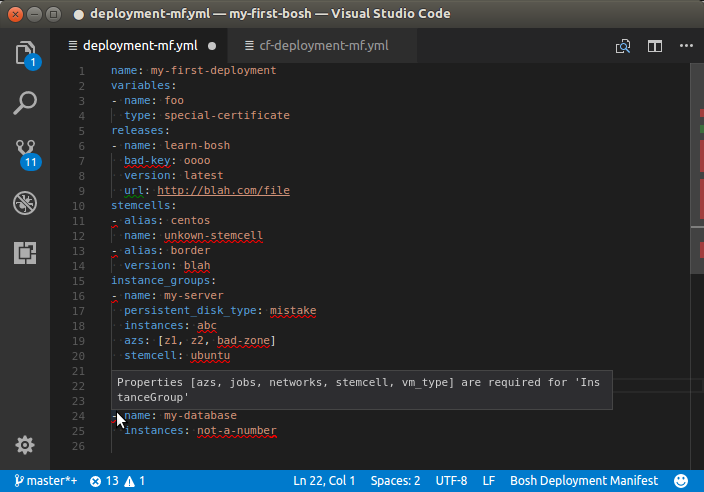
As you type the text is parsed and checked for basic syntactic and structural correctness. Hover over an error marker to see an explanation:
Content assist
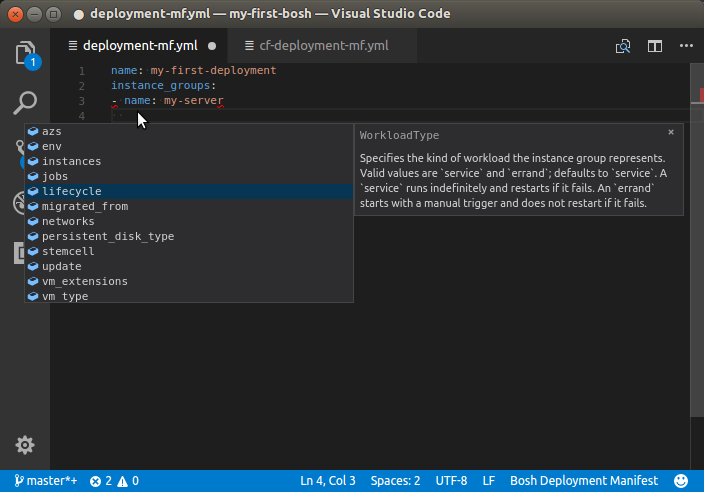
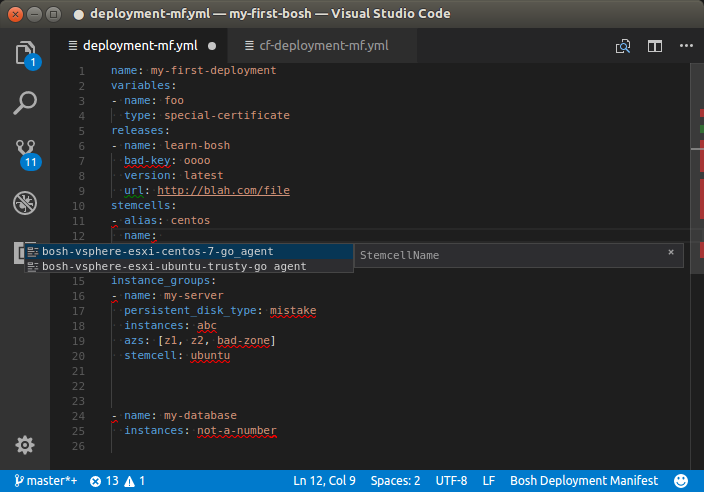
Having trouble remembering all the names of the attributes, and their spelling? Or can't remember the exact name/version of the stemcell you just uploaded to your bosh environment? Content assist to the rescue:
Documentation Hovers
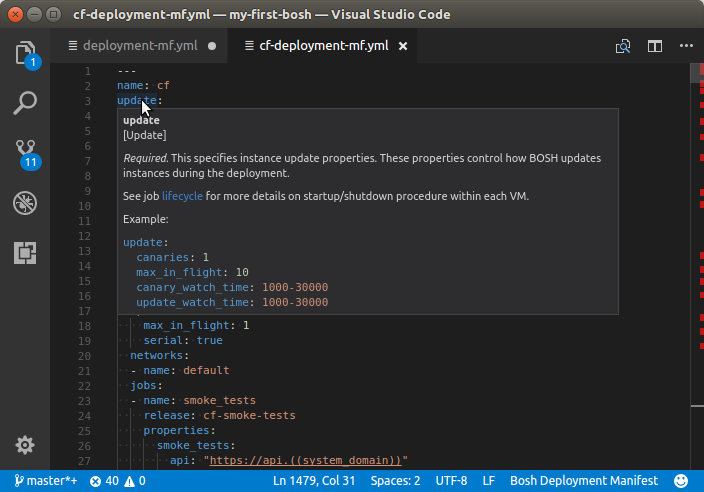
Having trouble remembering exactly what the meaning of each attribute is? Hover over an attribute and read its detailed documentation:
Goto Symbol in File
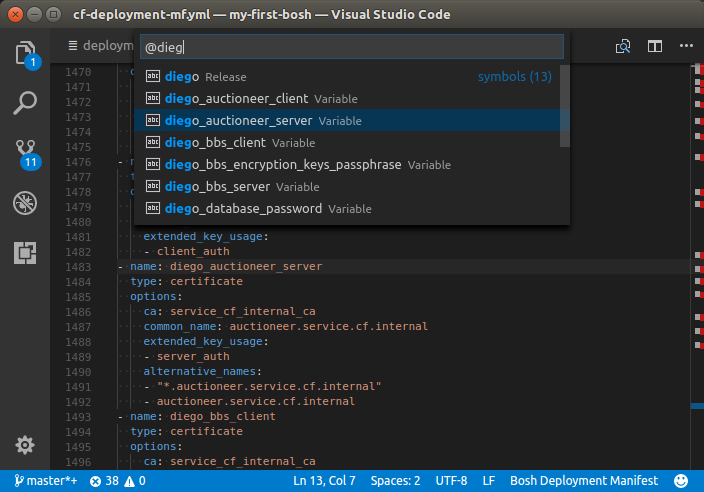
Is your Deployment Manifest getting larger and is it becoming harder to find a particular Instance Group, Release, or Stemcell definition? The "Goto Symbol in File" command helps you quickly jump to a specific definition.
Type CTRL-SHIFT-O to popup a list of all symbols in your current file. Start typing a name
(or portion thereof) to narrow down the list. Select a symbol to jump directly to its location in the
file.
Goto/Peek Definition
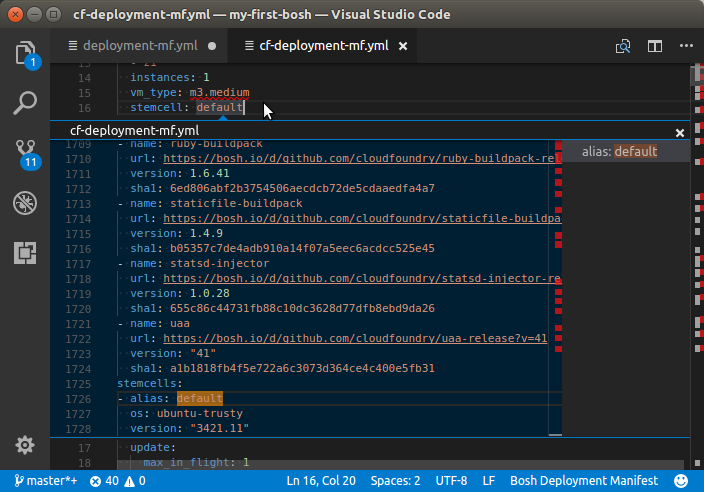
Use "Goto Defition" or "Peek Definition" to quickly go (or peek) from a Release or Stemcell name to its corresponding definition.
V2 versus V1 Schema
The editor is intended primarily to support editing manifests in the V2 schema. When you use attributes from the V1 schema the editor will detect this however and switch to 'V1 tolerance' mode.
In this mode, V1 properties are accepted but marked with deprecation warnings and V2 properties are marked as (unknown property) errors.
Usage
Activating the Editor
The Bosh editor automatically activates when the name of the .yml file you are editing
follows a certain pattern:
**/*deployment*.yml: activates support for Bosh manifest file.**/*cloud-config*.yml: activates support for Bosh cloud config.
You can also define your own patterns and map them to the language-id bosh-deployment-manifest or bosh-cloud-config
by defining files.associations in workspace settings.
See vscode documentation for details.
Targetting a specific Director
Some of the Validations and Content Assist depend on information dymanically retrieved from an active Bosh director. The editor retreives information by executing commands using the Bosh CLI. For this to work the CLI (V2 CLI is required) and editor have to be installed and configured correctly.
There are two ways to set things up to make this work:
Explicitly Configure the CLI:
From vscode, press CTRL-SHIFT-P and type Settings then select either Open User Settings or Open Workspace Settings.
The bosh cli is configured by specifying keys of the form bosh.cli.XXX. Content assist and hover docs show you the
available keys and their meaning.
Note that the bosh.cli.XXX settings do not allow you to provide credentials to connect to the director.
The editor assumes that you are providing the credentials implicitly by using the bosh login command from a terminal.
The bosh cli will persist the credentials in ~/.bosh/config and read them from there. A typical sequence of commands
to store the credentials would be something like the following:
First, create an alias for your environment:
$ bosh alias-env my-env -e 10.194.4.35 --ca-cert <(bosh int ./creds.yml --path /director_ssl/ca)
Using environment '10.194.4.35' as anonymous user
...
Succeeded
$
Second, obtain username/password for your director. For example:
$ bosh int ./creds.yml --path /admin_password
very-secret-admin-password

Succeeded
Now use bosh login to establish a session and store the credentials:
$ bosh login -e my-env
Username (): admin
Password (): very-secret-admin-password

Using environment '10.194.4.35' as client 'admin'

Logged in to '10.194.4.35'

Succeeded
You can verify that CLI is setup correctly by executing a command like:
$ bosh -e my-env cloud-config
...
Succeeded
Implictly Configure the CLI:
If the bosh cli is not explicitly configured, the editor will, by default, try to execute commands like bosh cloud-config --json
and bosh stemcells --json without an explicit -e ... argument. This works only if you ensure that the editor
process executes with a proper set of OS environment variables:
PATH: must be set so thatboshcli executable can be found and refers to the V2 CLI.BOSH_ENVIRONMENT: must be set to point to the bosh director you want to target.
If you start vscode from a terminal, you can verify that things are setup correctly by executing command:
bosh cloud-config
If that command executes without any errors and returns the cloud-config you expected, then things are setup correctly. If you subsequently launch vscode from that same terminal the dynamic CA and linting should work correctly.
Issues and Feature Requests
Please report bugs, issues and feature requests on the Github STS4 issue tracker.