
3.7 KiB
Atom package for Spring Boot projects


Atom package and Language Server providing support for working with Spring Boot apps in Java.
Usage:
The extension will automatically activate when you edit files with the following name patterns:
*.java=> activates support for Java files
Functionality
Navigating the source code - Go to symbol in file
Easy navigation to Spring-specific elements of your source code. Open .java file then open Atom's Outline View - View -> Toggle Outline View

Live application information hovers
Show information from running Spring Boot apps on your machine in the source code. This allows you to run the Spring Boot app locally on your machine and visualizes information from those running apps in your source code.
Visualization
Once the tooling detects a running Spring Boot app on your local machine, it automatically shows hints in the source code where data from the running app can be inspected. Then hovering over that area (with the mouse pointer), the data from the running app shows up.
If there are multiple instances of the app running on your machine, the live data from all those instances will show up in the hover information.
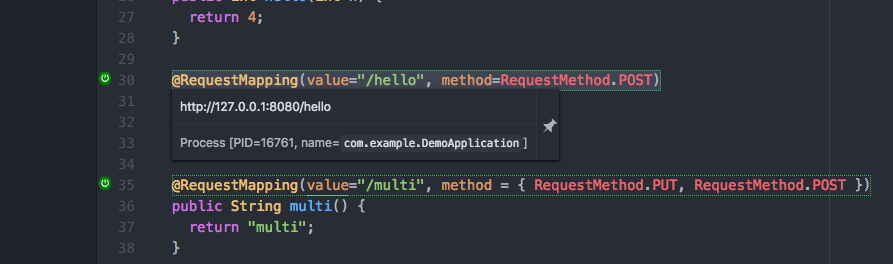
Examples
@Profile: shows information about the active profiles on the running apps@Component,@Bean,@Autowired: shows detailed information about the beans and their wiring from the live app@ContidionalOn...: shows information about the conditions and their evaluation at runtimeRequestMapping: show information about the request mapping for running apps
Configuration
You can enable/disable this feature via workspace preferences by adding the following:
  "boot-java":
    "boot-hints":
      on: false
Smart code completions
Additional code completions for Spring-specific annotations

Examples
@Value: code completion for Spring Boot property keys@Scope: code completion for standard scope names
Releases:
Released versions of this package can be installed directly from the Atom package installer.
There are also development snapshots available with the latest fixes and improvements as a .tgz file
that can be donwloaded from
here. To install it:
- Unpack into a folder
<package>(this folder should havepackage.jsonfile) - Execute
apm link .from that folder - Execute
Window Reload(Package -> Command Palette -> Toggle then search for it) command in the opened Atom instance or open an Atom instance