 0024e4dd49
* ChatMemory will become a generic interface to implement different memory management strategies. It’s been moved from the “”spring-ai-client-chat” package to “spring-ai-model” package while retaining the same package, so it’s transparent to users.
* A MessageWindowChatMemory has been introduced to provide support for a chat memory that keeps at most N messages in the memory.
* A ChatMemoryRepository interface has been introduced to support different storage strategies for the chat memory. It’s meant to be used as part of a ChatMemory implementation. This is different than before, where the storage-specific implementation was directly tied to the ChatMemory. This design is familiar to Spring users since it’s used already in the ecosystem. The goal was to use a programming model similar to Spring Session and Spring Data.
* The JdbcChatMemory has been supersed by JdbcChatMemoryRepository.
* A ChatMemory bean is auto-configured for you whenever using one of the Spring AI Model starters. By default, it uses the MessageWindowChatMemory implementation and stores the conversation history in memory. If a different repository is already configured (e.g., Cassandra, JDBC, or Neo4j), Spring AI will use that instead.
* First-class documentation has been introduced to describe the ChatMemory API and related features.
* All the changes introduced in this PR are backward-compatible.

Signed-off-by: Thomas Vitale <ThomasVitale@users.noreply.github.com>
Spring AI 

The Spring AI project provides a Spring-friendly API and abstractions for developing AI applications.
Its goal is to apply to the AI domain Spring ecosystem design principles such as portability and modular design and promote using POJOs as the building blocks of an application to the AI domain.
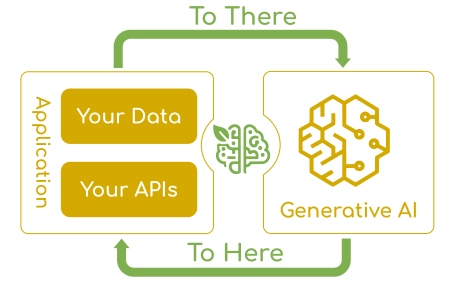
At its core, Spring AI addresses the fundamental challenge of AI integration: Connecting your enterprise Data and APIs with the AI Models.
The project draws inspiration from notable Python projects, such as LangChain and LlamaIndex, but Spring AI is not a direct port of those projects. The project was founded with the belief that the next wave of Generative AI applications will not be only for Python developers but will be ubiquitous across many programming languages.
You can check out the blog post Why Spring AI for additional motivations.
This is a high level feature overview. You can find more details in the Reference Documentation
- Support for all major AI Model providers such as Anthropic, OpenAI, Microsoft, Amazon, Google, and Ollama. Supported model types include:
- Portable API support across AI providers for both synchronous and streaming options. Access to model-specific features is also available.
- Structured Outputs - Mapping of AI Model output to POJOs.
- Support for all major Vector Database providers such as Apache Cassandra, Azure Vector Search, Chroma, Milvus, MongoDB Atlas, MariaDB, Neo4j, Oracle, PostgreSQL/PGVector, PineCone, Qdrant, Redis, and Weaviate.
- Portable API across Vector Store providers, including a novel SQL-like metadata filter API.
- Tools/Function Calling - permits the model to request the execution of client-side tools and functions, thereby accessing necessary real-time information as required.
- Observability - Provides insights into AI-related operations.
- Document injection ETL framework for Data Engineering.
- AI Model Evaluation - Utilities to help evaluate generated content and protect against hallucinated response.
- ChatClient API - Fluent API for communicating with AI Chat Models, idiomatically similar to the WebClient and RestClient APIs.
- Advisors API - Encapsulates recurring Generative AI patterns, transforms data sent to and from Language Models (LLMs), and provides portability across various models and use cases.
- Support for Chat Conversation Memory and Retrieval Augmented Generation (RAG).
- Spring Boot Auto Configuration and Starters for all AI Models and Vector Stores - use the start.spring.io to select the Model or Vector-store of choice.
Getting Started
Please refer to the Getting Started Guide for instruction on adding your dependencies.
Project Resources
- Awesome Spring AI - A curated list of awesome resources, tools, tutorials, and projects for building generative AI applications using Spring AI
- Spring AI Examples contains example projects that explain specific features in more detail.
Breaking changes
- Refer to the upgrade notes to see how to upgrade to 1.0.0.M1 or higher.
Cloning the repo
This repository contains large model files. To clone it you have to either:
- Ignore the large files (won't affect the spring-ai behaviour) :
GIT_LFS_SKIP_SMUDGE=1 git clone git@github.com:spring-projects/spring-ai.git. - Or install the Git Large File Storage before cloning the repo.
Building
To build with running unit tests
./mvnw clean package
To build including integration tests.
./mvnw clean verify -Pintegration-tests
Note that you should set API key environment variables for OpenAI or other model providers before running. If the API key isn't set for a specific model provider, the integration test is skipped.
To run a specific integration test allowing for up to two attempts to succeed. This is useful when a hosted service is not reliable or times out.
./mvnw -pl vector-stores/spring-ai-pgvector-store -Pintegration-tests -Dfailsafe.rerunFailingTestsCount=2 -Dit.test=PgVectorStoreIT verify
Integration Tests
There are many integration tests ,so it often isn't realistic to run them all at once.
A quick pass through the most important pathways that runs integration tests for
- OpenAI models
- OpenAI autoconfiguration
- PGVector
- Chroma
can be done with the profile -Pci-fast-integration-tests and is used in the main CI build of this project.
A full integration test is done twice a day in the Spring AI Integration Test Repository
One way to run integration tests on part of the code is to first do a quick compile and install of the project
./mvnw clean install -DskipTests -Dmaven.javadoc.skip=true
Then run the integration test for a specific module using the -pl option
./mvnw verify -Pintegration-tests -pl spring-ai-spring-boot-testcontainers
Documentation
To build the docs
./mvnw -pl spring-ai-docs antora
The docs are then in the directory spring-ai-docs/target/antora/site/index.html
To reformat using the java-format plugin
./mvnw spring-javaformat:apply
To update the year on license headers using the license-maven-plugin
./mvnw license:update-file-header -Plicense
To check javadocs using the javadoc:javadoc
./mvnw javadoc:javadoc -Pjavadoc
To build with checkstyles enabled. Checkstyles are currently disabled, but you can enable them by doing the following:
./mvnw clean package -DskipTests -Ddisable.checks=false