Chapter 4. Configuring and Running a Job
In the domain section , the overall architecture design was discussed, using the following diagram as a guide:
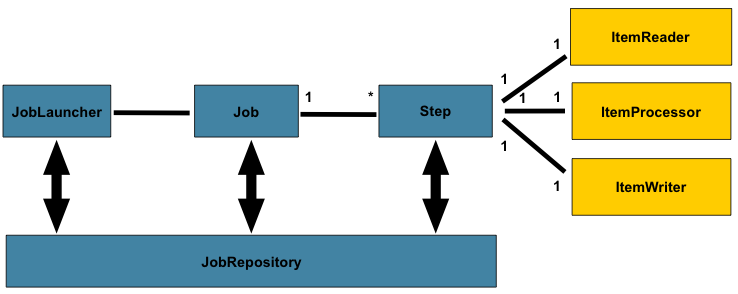
While the Job object may seem like a simple
container for steps, there are many configuration options of which a
developers must be aware . Furthermore, there are many considerations for
how a Job will be run and how its meta-data will be
stored during that run. This chapter will explain the various configuration
options and runtime concerns of a Job .
Configuring a Job
There are multiple implementations of the
Job interface, however, the namespace
abstracts away the differences in configuration. It has only three
required dependencies: a name, JobRepository , and
a list of Steps.
<job id="footballJob">
    <step id="playerload"          parent="s1" next="gameLoad"/>
    <step id="gameLoad"            parent="s2" next="playerSummarization"/>
    <step id="playerSummarization" parent="s3"/>
</job>
The examples here use a parent bean definition to create the steps; see the section on step configuration for more options declaring specific step details inline. The XML namespace defaults to referencing a repository with an id of 'jobRepository', which is a sensible default. However, this can be overridden explicitly:
<job id="footballJob" job-repository="specialRepository">
    <step id="playerload"          parent="s1" next="gameLoad"/>
    <step id="gameLoad"            parent="s3" next="playerSummarization"/>
    <step id="playerSummarization" parent="s3"/>
</job>
In addition to steps a job configuration can contain other elements
that help with parallelisation (<split/>),
declarative flow control (<decision/>) and
externalization of flow definitions
(<flow/>).
Restartability
One key issue when executing a batch job concerns the behavior of
a Job when it is restarted. The launching of a
Job is considered to be a 'restart' if a
JobExecution already exists for the particular
JobInstance. Ideally, all jobs should be able to
start up where they left off, but there are scenarios where this is not
possible. It is entirely up to the developer to
ensure that a new JobInstance is created in this
scenario. However, Spring Batch does provide some help. If a
Job should never be restarted, but should always
be run as part of a new JobInstance, then the
restartable property may be set to 'false':
<job id="footballJob" restartable="false">
    ...
</job>
To phrase it another way, setting restartable to false means "this
Job does not support being started again". Restarting a Job that is not
restartable will cause a JobRestartException to
be thrown:
Job job = new SimpleJob();
job.setRestartable(false);

JobParameters jobParameters = new JobParameters();

JobExecution firstExecution = jobRepository.createJobExecution(job, jobParameters);
jobRepository.saveOrUpdate(firstExecution);

try {
    jobRepository.createJobExecution(job, jobParameters);
    fail();
}
catch (JobRestartException e) {
    // expected
}
This snippet of JUnit code shows how attempting to create a
JobExecution the first time for a non restartable
job will cause no issues. However, the second
attempt will throw a JobRestartException.
Intercepting Job Execution
During the course of the execution of a
Job, it may be useful to be notified of various
events in its lifecycle so that custom code may be executed. The
SimpleJob allows for this by calling a
JobListener at the appropriate time:
public interface JobExecutionListener {

    void beforeJob(JobExecution jobExecution);

    void afterJob(JobExecution jobExecution);

}JobListeners can be added to a
SimpleJob via the listeners element on the
job:
<job id="footballJob">
    <step id="playerload"          parent="s1" next="gameLoad"/>
    <step id="gameLoad"            parent="s2" next="playerSummarization"/>
    <step id="playerSummarization" parent="s3"/>
    <listeners>
        <listener ref="sampleListener"/>
    </listeners>
</job>
It should be noted that afterJob will be
called regardless of the success or failure of the
Job. If success or failure needs to be determined
it can be obtained from the JobExecution:
public void afterJob(JobExecution jobExecution){
    if( jobExecution.getStatus() == BatchStatus.COMPLETED ){
        //job success
    }
    else if(jobExecution.getStatus() == BatchStatus.FAILED){
        //job failure
    }
}
The annotations corresponding to this interface are:
@BeforeJob@AfterJob
Inheriting from a Parent Job
If a group of Jobs share similar, but not
identical, configurations, then it may be helpful to define a "parent"
Job from which the concrete
Jobs may inherit properties. Similar to class
inheritance in Java, the "child" Job will combine
its elements and attributes with the parent's.
In the following example, "baseJob" is an abstract
Job definition that defines only a list of
listeners. The Job "job1" is a concrete
definition that inherits the list of listeners from "baseJob" and merges
it with its own list of listeners to produce a
Job with two listeners and one
Step, "step1".
<job id="baseJob" abstract="true">
    <listeners>
        <listener ref="listenerOne"/>
    <listeners>
</job>

<job id="job1" parent="baseJob">
    <step id="step1" parent="standaloneStep"/>

    <listeners merge="true">
        <listener ref="listenerTwo"/>
    <listeners>
</job>
Please see the section on Inheriting from a Parent Step for more detailed information.
JobParametersValidator
A job declared in the XML namespace or using any subclass of AbstractJob can optionally declare a validator for the job parameters at runtime. This is useful when for instance you need to assert that a job is started with all its mandatory parameters. There is a DefaultJobParametersValidator that can be used to constrain combinations of simple mandatory and optional parameters, and for more complex constraints you can implement the interface yourself. The configuration of a validator is supported through the XML namespace through a child element of the job, e.g:
<job id="job1" parent="baseJob3">
    <step id="step1" parent="standaloneStep"/>
    <validator ref="paremetersValidator"/>
</job>
The validator can be specified as a reference (as above) or as a nested bean definition in the beans namespace.